Shipping Faster with Tiny Vertical Slices
Most of you will already know the idea of cutting scope to ship faster. This is core to what “Agile” meant to be. Unfortunately, people fear “agile” today because the term has been overloaded and abused for describing related things. This essay makes the point that we can be a lot more extreme in how we cut scope. Most things in this document will not be new to you, but how extreme they are applied is different.
What is a Tiny Vertical Slice?
You might ask yourself: What is a tiny vertical slice? How is it different from a stacked PR? If there are vertical slices, what are horizontal slices?
The terms “vertical slices” and “horizontal slices” refer to different concepts. For example, there is vertically sliced architecture, which is big in C# programming, but here we are talking about a working style, not architecture: working in vertical slices.
All of you are aware of the concept of stacked PRs to make them smaller and easier to review. Stacked PRs are already a common practice at Kombo. Stacking PRs means that you have multiple PRs for the same feature that depend on each other.
So what are vertical and horizontal slices now? You can imagine a feature being built on different horizontal layers (simplified):
- the database
- the API
- the frontend
In order to build the feature, you will need to work on all of these layers. The example above is simplified. The layers will vary for any feature and can take very different shapes and colors. For example, building something at Kombo might include the core framework or integration code as layers to consider. The key is to provide value to the user; you will need to span all layers of your implementation. In our product engineering context, there is typically also a layer for announcing the feature. Looking strictly at different layers, the feature does not provide value until the customer knows about it and starts using it.
A vertical slice is something that connects all these layers end-to-end and provides value in one shippable unit. That means a feature is in itself a vertical slice already. If we talk about tiny vertical slices, we mean cutting the feature smaller in scope. What does that mean?
Everything that we build has to solve a very concrete problem. To work in tiny vertical slices, there should be nothing else you can eliminate without reducing the value to 0. Anything you ship should be as simple as possible while carrying value.
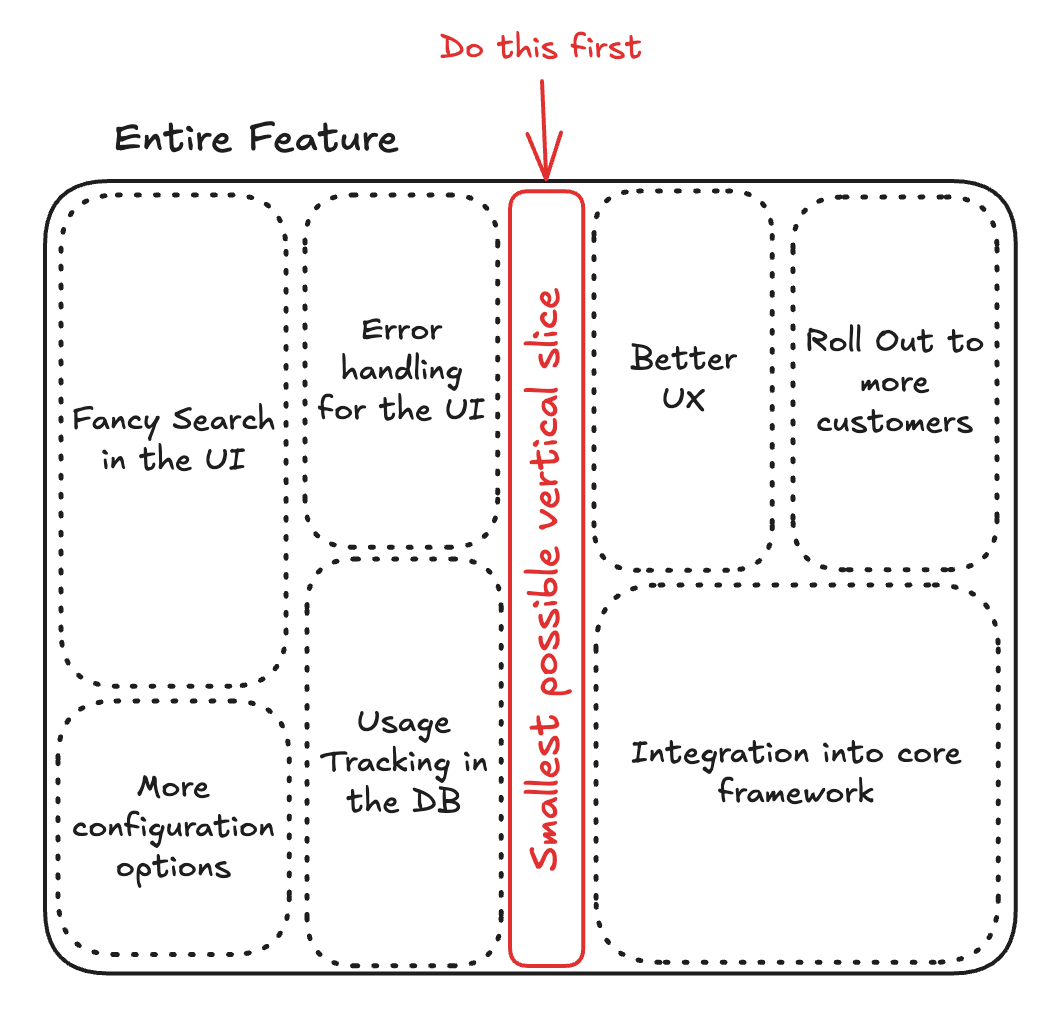
When we talk about vertical, when we talk about tiny vertical slices, they refer to the first end-to-end slice of a feature. Following additions typically are less critical to follow tiny vertical slices.
If your change has thousands of lines of code, that means you are usually not solving one increment of the problem, but multiple problems, too many increments at once, or you don’t know yet what the actual problem is that you try to solve, so you solve a bunch that handle all eventualities.
With “tiny vertical slices,” I mean the very extreme end of the spectrum of how thin a slice can be that still provides value. A tiny vertical slice of a feature covers the core workflow that the user needs. It doesn’t need great UX or solve all the eventualities yet. It just solves the core increment of a problem a user is having.
The sentence “Do it as simply as possible and as complex as necessary” is true, but it doesn’t show you how simple something can be in its most extreme form. You would be surprised how much you can eliminate complexity from something that you thought was simple already. A true tiny vertical slice should be so small that it feels stupid simple, and that you question whether it even needs a code review. You know why it feels like this? Because it is stupid simple and in many cases a diligent self review can actually be enough. There is just nothing to disagree with. That’s what makes you fast.
After a tiny vertical slice is shipped, you usually find you can add changes left and right of that slice. They are very easy to add and review, and they solve a single increment of the problem. The following slices don’t necessarily need to cut across all layers; sometimes they just work across a few.
Disclaimer: The concept of tiny vertical slices describes what “agile” means. The term “agile” got overused and expanded so much that it doesn’t really mean anything in today’s world anymore.
Stacking describes how PRs depend on each other.
Slicing describes what each increment accomplishes.
A stack of PRs can contain horizontal or vertical slices.
The Problem
As we got a lot better at working with stacked PRs and keeping PRs small over the past two years, we have often split PRs around layers. Doing so is intuitive: You ship the database changes, You ship some backend code, You ship some frontend code that makes the feature usable for the customer.
The problem with this approach is that reviewing the PR gets very hard because the reviewer needs to look across three different PRs to understand the whole flow end-to-end. There would often be cases where a function is exported but not called yet. In order to understand the change you will still need to look at all PRs. This hides a lot of complexity.
Complexity is the enemy of speed AND quality. The more complex something gets, the longer it takes to understand it, the longer it takes to ship it, and the harder it gets to eliminate all the edge cases and bugs. Saying it differently: simplicity = fast paced excellence.
As some features then have 3 to 5 stacked PRs that are getting merged all together in the end, it still took us a month until any value shipped. Changing the architecture of the stack during review becomes almost impossible because every change needs to be carried through three different layers of PRs. You will usually find that it’s easier to merge all the changes into one PR, rework it, and then split it up again.
When shipping something after one month of work, that means you will also only get feedback on your feature after one month of work. It might be that you misunderstood the requirements in the first place and that you solved the wrong problem. In that case the change not only introduced complexity to our product but also wasted lots of your time.
In addition to all the brainpower you are putting into the feature, solving lots of problems and eventualities requires a lot more decisions that all depend on each other in a single feature. Every decision that is made in a PR is subject to disagreement by the reviewer. This is why large PRs sometimes go through five cycles of review without getting any approval until the reviewer gets tired and just wants to get it done, because there is just so much to disagree about.
The Benefits of Tiny Vertical Slices
Your change will go live much faster with fewer mistakes and less discussion and effort, both by yourself and the reviewer. Following slices will be simpler, which allows you to operate with more autonomy.
- That means you will have something in the customer’s hands much earlier, which allows you to get feedback early.
- When you ship five capabilities together, you cannot tell which one created the value. A tiny slice gives you a much clearer signal of what helps and what is still missing.
- You and the reviewer have more time to spend on the important decisions, fewer mistakes, better architecture.
- You are able to de-prioritize the feature at any moment because value was already delivered to the customer and there is little work in progress that would drop.
- It is easier to revert or rework and the risk stays smaller.
How to work in Tiny Vertical Slices
The core concept of working in tiny vertical slices is eliminating complexity of a change until nothing else can be eliminated without taking the value or optionality downstream away. This implies two things:
- You need to understand exactly what problem you are solving. Otherwise you can’t tell where the value is that you provide. I usually find that looking in a PR and asking for every single thing “What problem is this solving?”, that there are often things that are not solving the core problem I want to solve. A common example for this are fields on API data models that the underlying APIs and our competitors expose, while we have never heard about these exact fields from our customers. Make a mental note for yourself to consider that these complexities might come in the future, but they can be left out for the initial slice (see next point).
- You need to understand what will come next so that you don’t take your options away or make it much harder to do next steps. Explore the wider direction, then commit only to what the current slice requires. Protect known one-way-door decisions, defer everything else. Having no endpoint yet is often better than publishing an endpoint you do not understand well enough.
Answering these two questions is not easy. Answering these two questions is the hardest part of product engineering. Building the feature itself and subsequent additions will be much easier once these questions are answered.
I found the following question makes it easy to get into the mindset of doing good vertical slices:
What could we do to ship this in two days?
The goal of slicing is not only eliminating code. It is eliminating decisions. Every additional decision creates another point of disagreement and interacts with the decisions around it. When thinking about it from this perspective, you will quickly find all the decisions that can be eliminated in the first slice. In most cases something that asks for additional infrastructure, complicated processing, and new primitives in the first design document often shrinks down to something that can be implemented in three files that just hooks into existing functionality.
Another benefit you get from this way of packaging and shipping your features is that you typically have to modularize them much more which makes unit testing a lot easier and decreases the friction of reworking the entire component a bit later in case you find out that previous assumptions are not true anymore. To make this more concrete: when implementing new functionality in Kombo, limiting yourself to two days of implementation will typically mean you avoid making any changes to the core framework. Just build a standalone component that hooks into existing places. Integrating your new module into the core framework can follow in a later slice. If you find your initial version to be the wrong one, it’s much easier to take it out and replace it with something different.
Not every feature should be developed in tiny vertical slices only. Using horizontal slices has its benefits as well. There are things that should be done as a tiny horizontal slice (e.g., introducing a new infrastructure component that is used afterward for a feature).
Another example of slices that are not vertical is refactoring. For some changes, you might need to refactor something first before doing the actual change. Refactoring should be as slim as possible and should not provide value to the customer, as it should not change logic to stay simple. Make the change easy, then make the easy change.
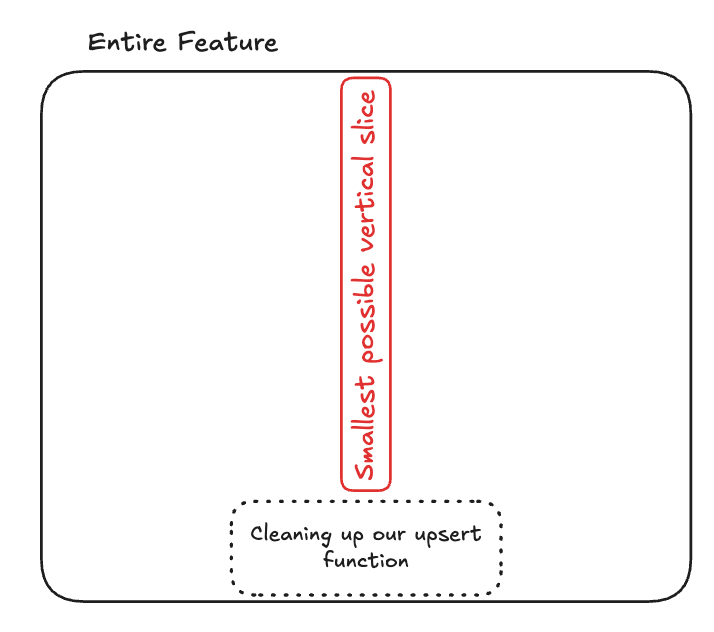
In other cases, there are benefits of splitting a tiny vertical slice horizontally again so you can ship different layers independently. For example, a risky change can be de-risked by doing the database change first. That is safe to do; then, do the application logic change so it can be reverted if it causes problems.
The concept of “tiny vertical slices” applies to new features the same way it applies to existing features. Doing this well is especially hard on new things because the gap of missing functionality and creating value is the largest. Applying the concept to additions to existing things is easier because the gap that needs to be bridged is smaller for creating value.
If you want to ask yourself if your changes followed good tiny vertical slicing, ask yourself the following:
- Did I create customer value?
- Is there any complexity that I could eliminate without taking away this value?
- Does my slice make sense as it stands alone?
Common Pitfalls
- AI is terrible at slicing vertically. If you have a large PR and want to slice it up with AI, AI will almost always slice it horizontally. The reason for that is that in two vertical slices that build on each other, the second slice will often times rework some of the code of the first slice. By pulling apart code of an existing PR, the simplification will usually not happen and just rip apart files and functions. Any given PR does not provide any value without the other PRs merged. In my opinion the best solution to this is starting from scratch and telling the AI about the other PR. It can look there for how to achieve it without copying it and being very explicit about the goal for each slice.
- Scoping down, building a tiny first slice does not mean being sloppy. The first slice usually needs to be the best and highest quality slice as it introduces the foundation of the feature. Doing tiny vertical slicing well equals fast paced excellence.
- The most common pitfall that is very hard to avoid is scoping slices too large. It is a hard-to-learn skill of cutting more and eliminating complexity. It feels often wrong not to do certain things that you know will follow in a later change. Including an additional field here, doing another check there, fixing some bug there, abstracting something into framework already all feel like tiny additions that can safely be shipped in the first PR but they should not. Any tiny change will compound and make the change complicated again. If they are worth it, they can follow in a later slice.
Example: Custom Fields V2
This example is modified a bit by me to illustrate how tiny vertical slices can be done best. In reality, we learned a lot about vertical slicing while working on this project.
Context
We have known for the past three years that our current custom field mapping feature lacks important functionality to handle specific cases. So far we have worked around it and avoided kicking off this project because we feared that it would be too large and complicated. By approaching it with tiny vertical slices, we have managed to ship this feature in less than a week and without causing any incidents.
Goal
We identified that customers often wanted to map custom fields more flexibly. They often wanted to:
- concatenate the values of multiple fields
- do complicated conditions
- extract specific items or values out of lists
- compute values
Our existing custom field functionality was not able to handle these requirements without support. We were hard coding these cases in the integration code, which created lots of support load and tech debt. We want to build a feature that turns this configuration into something that customers can do.
Evaluating options
Throughout the last two years we have spent a considerable amount of time evaluating different solutions we could take to solve this problem. We thought about building a complicated no-code formula editor. We thought about using some expression language, such as JSONata, and building our own expression language. Most recently we learned about the ability to execute untrusted JavaScript in our own system through WASM and QuickJS.
We decided that the most elegant option for us would be supporting JavaScript syntax because AI is great at writing this and it is easy to understand. We already started thinking about all the cool things we could build with AI writing formulas, inferring types from remote data the same way ITO does, unit testing the transformation, using a fancy Monaco editor in the dashboard, configuring default transformation across tools, applying them as well to remapping etc.
Scoping Down
We had a lot of ideas for how we can build a banger feature out of this, but we decided to start with a tiny version first.
There are some core components that we identified that are necessary for the first tiny vertical slice:
- For a given integration, specify a formula that does not live in the integration code itself to map the value of a specific custom field for a specific integration.
- A JavaScript formula has to be evaluated safely in our code as this whole solution breaks with this requirement.
- This has to work in the exact same way in syncs, actions, and webhooks (and other interactions for data consistency).
Note that this slice does not require storage of the formulas in our database yet. It does not require an editor. It only requires a registry of hard-coded formulas for each integration ID, model, and custom field so that it can be used. If the custom field was mapped through a custom field mapping then that would take precedence over the formula.
This slice allowed us to build a tiny module that we would hook into our existing upsert logic and only roll it out to hard-coded integration IDs. Doing so gave us a lot of confidence that this change could not break anything, that it could not be abused, and that it could be shipped within one day.
Secondary Slices
Next there are different directions we can take it further. An obvious one is establishing the option to configure formulas for each integration. We would need a next slice that has:
- Only a text box on the frontend where the user can enter code
- A table in our database where we can store the options
- A way to load in the code for every interaction
- A way to have formulas that apply to all connections of a tool.
Because we already know where the upserts would be handled and how the custom fields would be mapped, doing so is just a small bit of wiring up things. Because we don’t need to add a fancy editor because we don’t infer types, don’t generate previews, this next slice was still very easy to do.
After this we could build previews, better error handling, and related quality features.